Promotional spot ยท Feature your product at the top bar.Get spotlight

Deco My Tree

Decorate a 3D Christmas tree online, add a personal wish and signature, and download a free HD PNG picture without signing in.

Overview

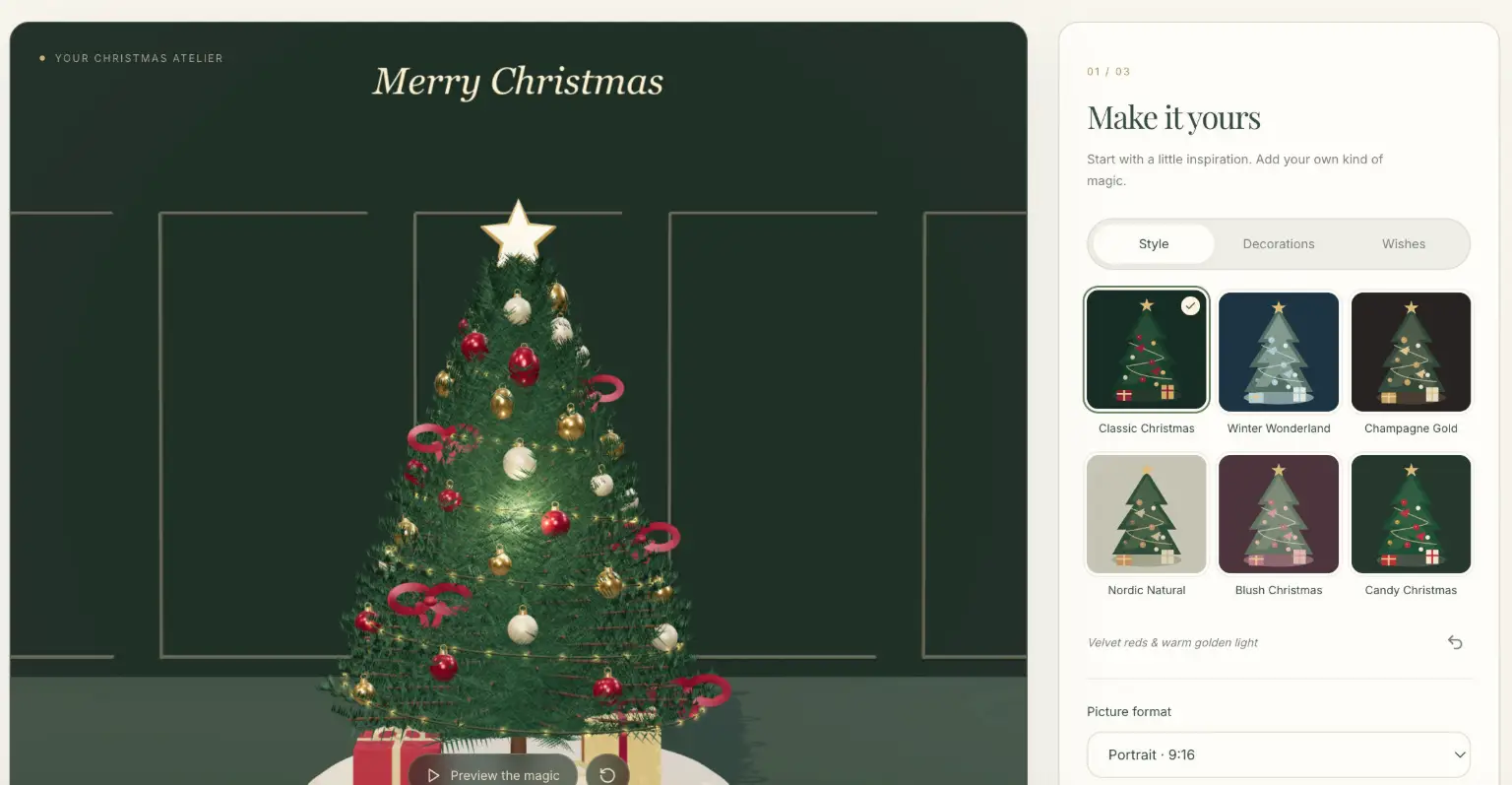
Deco My Tree is a free online 3D Christmas tree designer from Garden Letters. It lets you decorate a virtual tree, add a short Christmas greeting and signature, and download a high-resolution picture for sharing as a digital card, post or wallpaper โ€” no sign-in required to design or download.

Key Features

  • Six festive tree styles: Start from a complete composition โ€” Classic Christmas, Winter Wonderland, Champagne Gold, Nordic Natural, Blush Christmas or Candy Christmas โ€” each with coordinated tree, ornaments, lighting and presents. All styles are available from the start.
  • Detailed 3D customization: Drag to turn the tree and inspect branches, ribbons and reflective ornaments. Adjust ornament count and arrangement, switch lights on or off, choose a star or ribbon bow topper, and enable a snowfall setting.
  • Personal wishes: Add a Christmas greeting of up to 100 characters and a signature of up to 40 characters, with an Undo option to return to an earlier arrangement while experimenting.
  • Free HD PNG downloads: Export your design as a PNG with a longest edge of 2048 pixels in portrait (9:16), square (1:1) or landscape (16:9) format. Pictures include a small gardenletters.net signature.
  • Optional $12 Christmas film: A one-time purchase unlocks a silent, 12-second 1080p MP4 of one fixed design, with a light-up sequence, a gentle camera move and your wish appearing near the end. Repeat exports of the purchased design are included, with no subscription.

Typical Use Cases

  • A Christmas card for family and friends: Create a tree with a family name or a short "thinking of you" message, then download the picture and attach it to a message or email.
  • A softer greeting for couples and long-distance love: Choose Blush Christmas, add both names in the signature and save a portrait picture to send on Christmas morning.
  • Seasonal posts and phone wallpapers: Make a square festive post, a vertical phone picture or a landscape greeting for a group conversation, keeping the wording short for small screens.
  • A moving greeting: Preview the tree lighting up, then optionally purchase the 12-second film as a more animated holiday message.

How It Works

  1. Choose one of six Christmas tree styles in the designer.
  2. Open Decorations to adjust ornament count, lights, snowfall and the topper; open Wishes to write your greeting and signature.
  3. Drag the tree to inspect the details, using Undo if you prefer a previous version.
  4. Select portrait, square or landscape and download a free HD PNG โ€” or preview and purchase the optional film.

Who It's For

Deco My Tree suits anyone who wants a personal, festive digital greeting without design software: families sending holiday cards, couples apart at Christmas, and people preparing seasonal social posts or wallpapers. Because the core designer and PNG downloads are free and require no account, it works well for quick, low-effort holiday creations.

Deco My Tree turns a few quiet minutes into a personalized 3D Christmas tree picture that is easy to download and share.

Explore Similar Tools

Get today's LinkedIn Pinpoint answer with clues, hints, and explanations, plus a searchable archive of past solutions to improve your puzzle skills.

Paste two lists or drag in files to instantly see what is unique to each list, what they share, and the combined set.

SpriteCook turns text prompts into game-ready pixel art characters, props, tilesets, and animations with consistent style and engine-ready exports.

Tabisto turns every Chrome new tab into a calm dashboard for visual bookmarks, notes, reminders, workspaces and saved tab sessions.

Youmind is an AI studio that helps you collect inspiration, build understanding through questions, and turn ideas into articles, slides, images, videos, and webpages.

MK Edit is an AI prompt library that shares step-by-step prompts and editing ideas for turning photos into cinematic Instagram Reels and AI portraits.