Promotional spot · Feature your product at the top bar.Get spotlight

EzRemove

EzRemove is an AI-powered tool that removes image backgrounds in seconds, producing transparent PNG cutouts you can swap onto new colors or scenes.

Overview

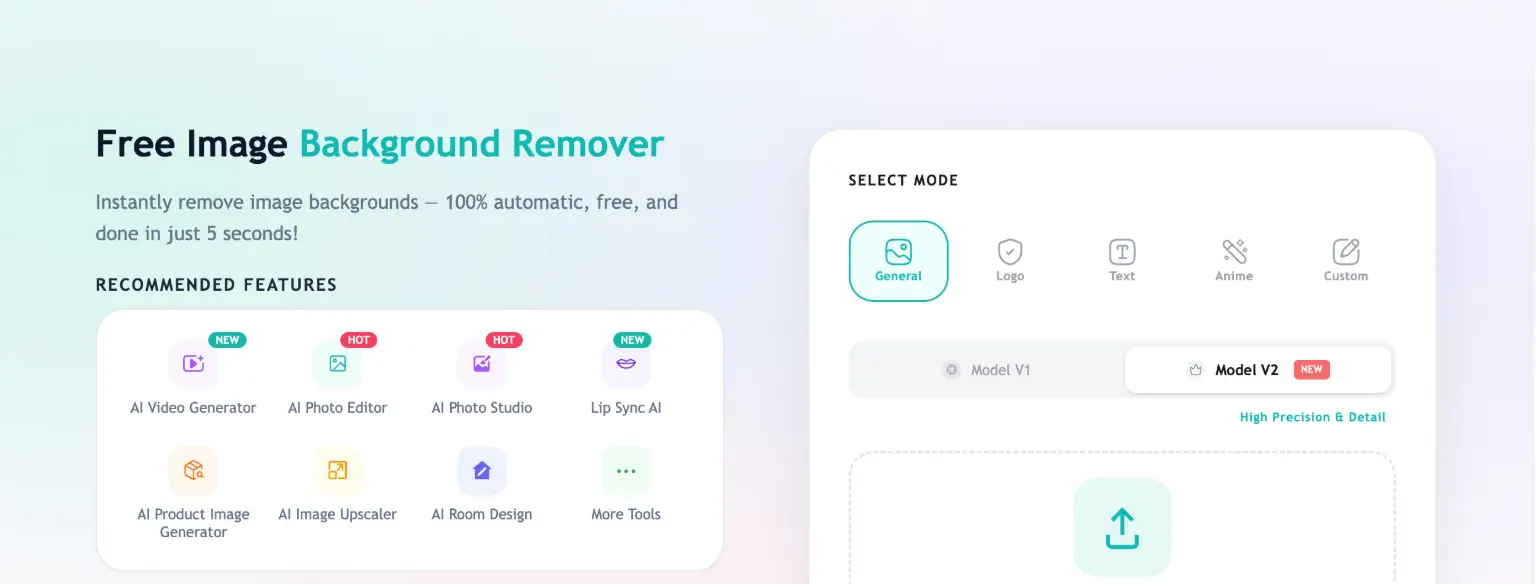
EzRemove is a free online AI background remover that automatically detects the subject in a photo and cuts out the background, leaving a clean transparent PNG. It replaces slow manual edge work in tools like Photoshop with a quick automated process, aimed at anyone who needs usable cutouts without a full editing project.

Key Features

  • Automatic AI background removal: Upload a photo and the tool detects the subject and removes the background, producing a transparent PNG with edges that stay natural around hair and fine details.
  • Multiple removal modes: Choose General for everyday photos, Logo for brand graphics, Text for screenshots, or Anime for illustrations, plus a Custom mode where you type a short prompt to remove a specific object or person.
  • Background replacement: After removal, keep the image transparent or switch to a solid color such as white, or generate a new AI background scene for a refreshed look.
  • Magic Eraser: Remove unwanted objects, clutter, or photobombers to keep the subject centered and the frame cleaner.
  • Batch processing: Remove backgrounds from multiple photos at once and export consistent transparent PNGs, useful when working with volume.
  • Format support: Accepts JPG, PNG, and HEIC uploads, with common formats such as WEBP also supported.

Typical Use Cases

  • E-commerce product photos: Cut out products, switch to white or brand colors, and keep every SKU visually consistent across listings, ads, and catalogs.
  • Portraits and profile images: Clean up portraits and personal photos, then download a transparent PNG for profile pics, posts, or resumes.
  • Logos and brand graphics: Remove a logo background while keeping edges crisp so the mark works on any color, website header, or social profile.
  • High-volume asset prep: Photographers, designers, and marketers can batch-process sets of images and export cutouts ready for layouts, ad creatives, or landing pages.

How It Works

  1. Upload a JPG, PNG, or HEIC image; clear subjects work best.
  2. Pick a mode (General, Logo, Text, Anime, or Custom) suited to the image type.
  3. The AI detects and removes the background, and you can refine the result if needed.
  4. Optionally change the background color or generate a new scene, then download the transparent PNG.

Who It's For

EzRemove suits individuals who need a quick cutout, photographers cleaning up shoots, marketers producing fresh creatives, developers preparing assets, e-commerce sellers standardizing product images, and teams managing visual consistency. Its mode-based workflow and batch processing make it practical for both one-off edits and volume work, and it runs in the browser on desktop and mobile.

EzRemove delivers fast, automatic transparent PNG cutouts for anyone who needs clean images without manual editing.

Explore Similar Tools

Codehype is a launch platform where founders list their SaaS, AI tools, and startups for free and get discovered across Google, AI search, and LLMs.

Get today's LinkedIn Pinpoint answer with clues, hints, and explanations, plus a searchable archive of past solutions to improve your puzzle skills.

Paste two lists or drag in files to instantly see what is unique to each list, what they share, and the combined set.

Upload any photo and let AI transform every face into the viral Kirkify look, then download and share the result in seconds.

Inngest adds durable functions to your existing code so background jobs, event-driven workflows, and AI agents retry, recover, and stay observable without extra infrastructure.

SpriteCook turns text prompts into game-ready pixel art characters, props, tilesets, and animations with consistent style and engine-ready exports.